Website Ownership, Cost, and Control: The Honest Answers Agencies Rarely Give


Most agencies are happy to show you mockups. They’ll walk you through color palettes, font choices, and homepage layouts. What they’re less eager to discuss: what you’ll actually own when the project ends, how much it should realistically cost, and whether the setup they’re proposing will make your life easier or harder in two years.
The Questions You Were Never Supposed to Ask
Most agencies are happy to show you mockups. They’ll walk you through color palettes, font choices, and homepage layouts. What they’re less eager to discuss: what you’ll actually own when the project ends, how much it should realistically cost, and whether the setup they’re proposing will make your life easier or harder in two years.
Those questions matter more than the mockups. They determine whether your website investment works for you — or against you.
This article answers them directly. No spin. No vague reassurances. Just clear answers on website ownership, which CMS to choose, what things cost, why projects run long, and how to know whether what you’re buying is built to last.
Ownership: What You Must Control
What should I own myself?
Five things. All of them. No exceptions.
1. Your domain. Registered in your name, your account, your payment method. Not your agency’s GoDaddy account.
2. Your hosting account. Someone else can manage it, but the account should be yours.
3. Your website files and code. You receive everything at project completion — not a link to a staging site.
4. Full CMS admin access. Not an editor role. Admin credentials, in your hands.
5. Design source files. Figma files, PSDs, whatever was used. Delivered at handoff.
If you don’t have all five, your ownership is incomplete. That’s not a technicality — it’s a real business risk.
What happens if my developer disappears?
If your assets are in your accounts: not much changes. You need to find a new person, but your site keeps running and you can hand off everything to whoever comes next.
If your assets are in their accounts: you have a serious problem. Your domain could go dark. Your site could become inaccessible. You’d be starting over.
Check right now. Is your domain registered in your name? Do you have admin-level CMS access? If you’re not sure, find out before you do anything else.
How do I avoid being locked into one provider?
Use open platforms: WordPress, Webflow, standard hosting providers. Avoid proprietary site builders that only the agency can access or modify!
Technology: Which Platform Is Actually Right for You
WordPress, Webflow, Shopify, or custom code?
Here’s an honest breakdown of each:

WordPress is the right choice for most service businesses. It’s the most flexible platform available, with a massive ecosystem of plugins and developers. Non-technical team members can manage it with proper setup. The tradeoff: it requires ongoing maintenance, including security updates and plugin management.

Webflow delivers designer-quality results without requiring a developer for day-to-day updates. It’s excellent for businesses that want a visually distinctive site their own team can manage. Hosting costs are slightly higher than WordPress, but the reduced developer dependency often offsets that.

Shopify is built for e-commerce. If you sell products, it’s usually the right call. Strong app ecosystem, predictable pricing, and it handles the complexity of online retail well. If you’re a service business, it’s not the right fit.

Custom code is the most flexible option and the most expensive to build and maintain. Without the original developer, even small updates become a project. It’s only justified when a standard platform genuinely cannot do what you need — which is rare for most businesses.
The rule: choose the simplest platform that meets your actual requirements. Every layer of unnecessary complexity becomes a future maintenance cost.
Do I need a CMS?
Yes. If you ever want to update text, swap an image, publish a blog post, or change a team member’s bio without calling a developer — you need a content management system.
The only exception is a completely static site that will never change. That describes almost no real business.
Can we improve the current site without rebuilding everything?
Often yes. Before committing to a full rebuild, check whether targeted fixes address the real problem:
Rewrite the homepage copy
Add trust signals: testimonials, case studies, client logos
Improve the mobile experience
Fix page speed issues
A full rebuild makes sense when the site’s structure is fundamentally wrong, the platform is genuinely limiting your growth, technical debt has accumulated to the point where fixes cost more than starting fresh, or your brand has changed significantly.
How do I know whether custom development is worth it?
Ask one question: “What does this do that WordPress or Webflow can’t?”
If the answer is specific — complex third-party integrations, unique functionality at scale, specific regulatory requirements — custom development may be justified. If the answer is vague, it probably isn’t. For most service businesses, it isn’t needed.
Cost: What Things Actually Cost
How much should a website cost?
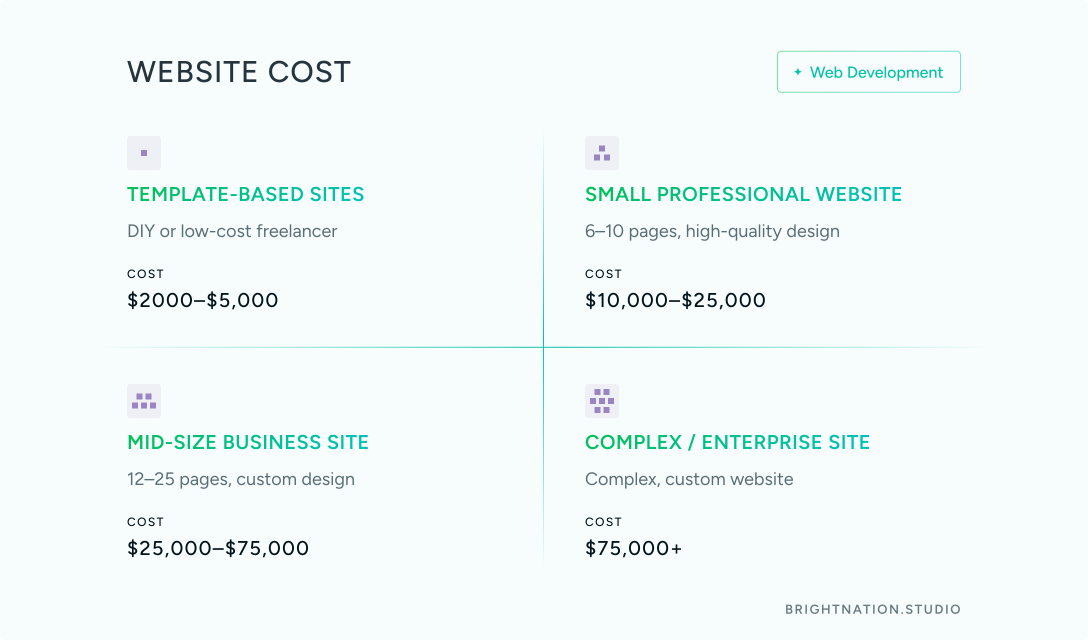
Here are realistic ranges, not marketing estimates:
Template-based sites (DIY or low-cost freelancer): $2000–$5,000. Fast and generic. You get what you pay for.
Small professional site (6–10 pages, high quality design, proper setup): $10,000–$25,000.
Mid-size business site (12–25 pages, high quality custom design, proper setup, content support): $25,000–$75,000.
Complex or enterprise sites: $75,000 and up.
The uncomfortable truth: a high price doesn’t guarantee quality. But a very low price almost always guarantees shortcuts — in security, in structure, in how well it’s built to last.
How do I avoid surprise costs during a redesign?
Surprises come from the same places every time: scope that wasn’t defined clearly, content that wasn’t ready, platform costs that weren’t disclosed, hosting that wasn’t included, SEO migration that wasn’t scoped, and post-launch support that was never priced.
Before you sign anything, ask these questions explicitly:
Is hosting included?
Is training included?
What happens if the scope changes?
What is specifically NOT included in this proposal?
Demand an itemized proposal. If an agency can’t provide one, that tells you something.
Timing and Process: Why Projects Take Longer
Why do website projects always run over schedule?
Five causes, almost every time: content isn’t ready, the approval process is slow, scope changes mid-project, there’s no dedicated project lead on either side, or milestones weren’t defined at the start.
Both sides are accountable.
Your role: Have content ready before the project starts, or contract for copywriting as part of the scope. Designate one decision-maker. Respond to requests within two to three business days.
Their role: A fixed milestone schedule from day one. A dedicated project lead. A clear, approved brief before design begins.
If either side skips these steps, the timeline slips. It’s predictable.
How do I make sure the site is easy for my team to manage?
Say it explicitly at the start: “This site must be manageable by non-technical staff.” Then verify it.
Get a demo of the CMS before the project begins. Include team training in the contract. Before launch, test it yourself: can someone on your team update the homepage without calling a developer? If not, the build isn’t done.
How do I know whether my website was built the right way?
Four checks. Run them now if you have an existing site:
1. Google PageSpeed Insights: Mobile score above 70.
2. Google Search Console: No indexing errors.
3. CMS access test: Can you update a page without developer help?
4. Ownership check: Is your domain in your name? Do you have all login credentials?
If all four pass, the site was built responsibly. If any fail, you know where the problems are.
The Honest Self-Check
Before investing in any website work, answer these five questions:
- Do you control your domain, hosting, and CMS?
- Can your team update content without hiring someone?
- Do you know your current site’s mobile PageSpeed score?
- Is your website generating meaningful leads or inquiries?
- Do you know which pages drive traffic and which are being ignored?
The answers tell you exactly how much work there is to do — and where to start.
These Questions Deserve Straight Answers
An agency that can’t clearly answer “what will I own?”, “how much does this cost?”, or “why does this take four months?” is building a relationship that serves them, not you.
The right team welcomes these questions. They’ve seen what happens when they’re skipped.
At Bright Nation Studio, we answer all of them before the proposal. How long, what it costs, what you own, how you’ll update it, and what happens when the project is done. Working with us shouldn’t require courage. Just clarity. Talk to Bright Nation Studio.