How AI Is Transforming UX Design: New Workflows, New Roles, New Rules


The best designers are moving from execution to strategy, directing AI tools, curating outputs, and solving the problems machines can’t see.
From Tool to Capability Layer
AI adoption among enterprises doubled in the first half of 2025, jumping from 5% to 10%. By early 2026, ChatGPT had reached 800 million users. These aren’t abstract milestones. They signal something concrete: AI has crossed the threshold from occasional tool to embedded capability layer.
For UX design, that shift is structural. AI is now woven into research, ideation, wireframing, and optimization. Teams using it well are seeing 20-30% reductions in build time and project costs. The bottlenecks that once defined design timelines are breaking open.
But here’s what the headlines miss. AI isn’t replacing designers. It’s changing what designers do. The best ones are moving from execution to strategy, from drawing every screen to directing the machine, curating the output, and solving the problems AI can’t see.
Here’s what’s actually changing.
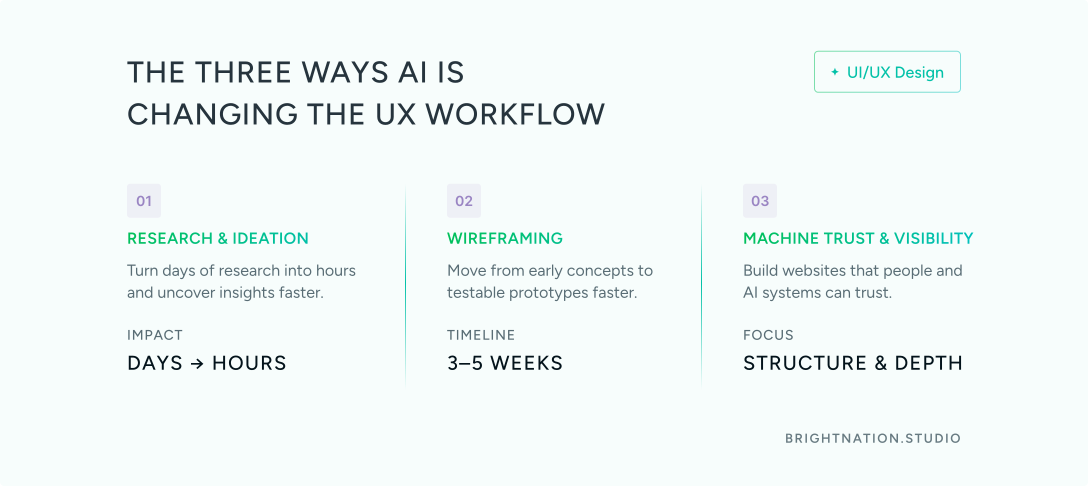
The Three Ways AI Is Changing the UX Workflow
1. Research and Ideation Acceleration
User research has always been slow. Transcribing interviews, tagging notes, clustering sentiment across dozens of sessions. That work used to take days. AI compresses it to hours.
Tools now handle the heavy lifting: auto-transcription, sentiment tagging, pattern clustering across qualitative data. What changes for the designer isn’t the insight. It’s the speed of getting there.
AI also widens the solution space earlier. It can generate alternative user flows and surface edge cases during brainstorming that a human team might not reach until week three. That means strategic decisions happen sooner, with more options on the table.
The designer’s role in this phase isn’t to do less. It’s to do different. Frame the right questions. Interpret the patterns. Make the calls that require judgment, context, and human understanding.
2. AI Wireframing: Breaking the Bottleneck
Manual wireframing was one of the most expensive time sinks in any digital project. Weeks could pass before a client saw a clickable prototype. By then, direction had already calcified.
That timeline has collapsed. With tools like Figma AI, Replit, Loveable, and UIPilot, teams are moving from concept to prototype-ready spec in 3-5 weeks. Production-ready version one is achievable in 10-14 weeks. That’s a meaningful compression for any business trying to move fast.
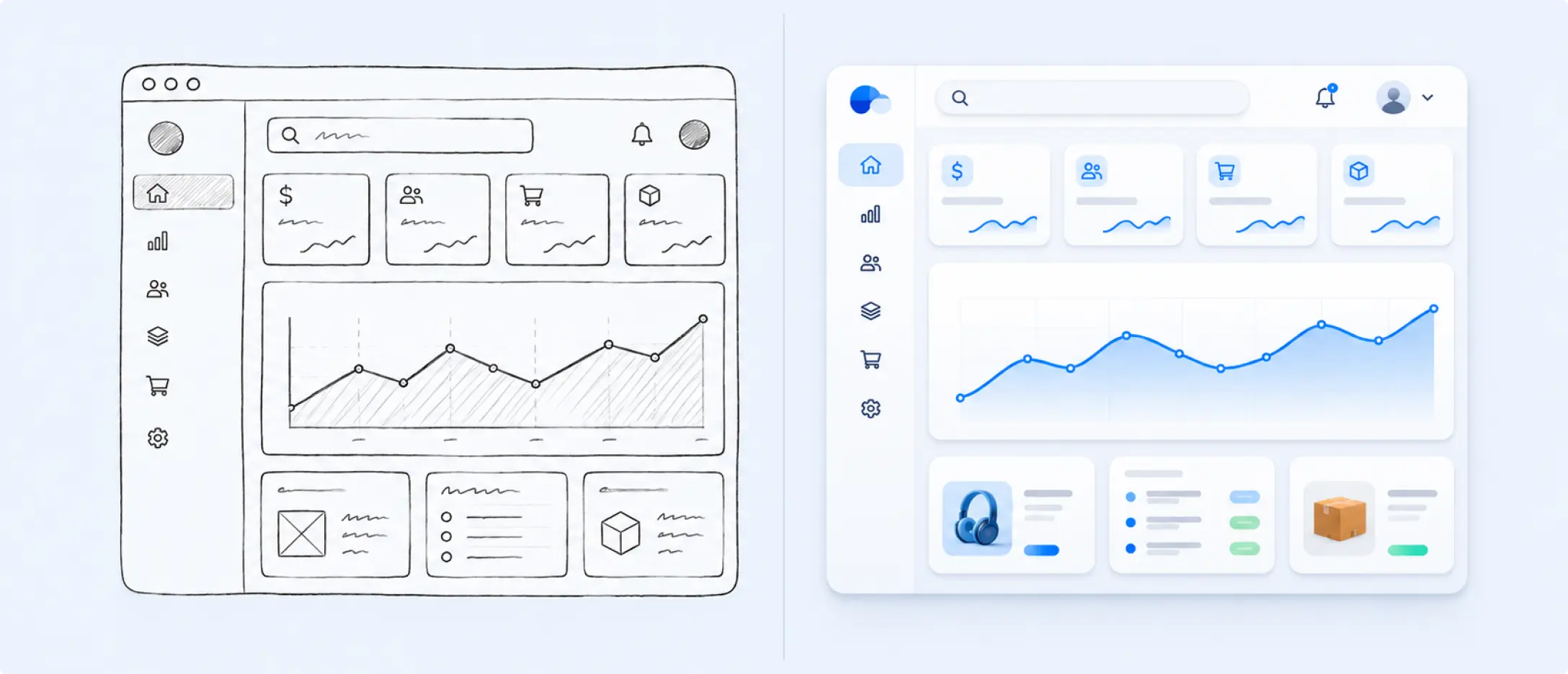
Designers aren’t drawing every screen anymore. They’re directing the structure and refining the output. The craft hasn’t disappeared. It’s shifted upstream. Faster prototypes mean faster client feedback, more iteration cycles, and better final products.
3. Designing for Machine Trust: The New Audience
This one catches most teams off guard. Websites are now evaluated by AI systems before humans ever see them. When someone asks ChatGPT, Perplexity, or a Google SGE result for a recommendation, those systems are reading your site and making trust decisions.
The signals they look for: content depth (not just what you do, but why it matters), consistency across pages, visible leadership and credentials, and structural clarity. These are E-E-A-T signals, and they’ve become UX requirements, not just SEO considerations.
If AI systems don’t trust your site, they won’t surface it in generative search results. That’s a visibility problem with a design solution. Structure, transparency, and depth need to be built into the experience from the start.
The real value of AI in design isn’t replacing creativity. It’s making more room for human insight and better decisions.
What Designers Are Becoming: The Editorial Role
The value of a UX designer is shifting. Low-value work is shrinking fast: manual tagging, repetitive wireframing, basic layout decisions. AI handles those now.
What’s expanding: framing problems, interpreting human behavior, making ethical calls, and curating AI output with judgment.
The best way to understand this shift is through the concept of the editorial designer. Like an editor at a publication, this person doesn’t write every word. They direct, evaluate, correct, and make the final call on what ships. They know which of 20 AI-generated outputs is actually right for this user, this context, this business goal.
Take Streetbeat, a fintech platform built around AI-driven investment insights. The UX challenge wasn’t generating the insights. It was translating AI model outputs into interfaces that felt trustworthy and responsible to real users. That required human judgment at every turn.
The skills that matter now:
Prompt engineering: Directing AI tools to produce useful, accurate output
Strategic thinking: Staying focused on the actual problem being solved
Curation judgment: Knowing which output is right, and why
Ethical oversight: Catching bias, protecting privacy, maintaining transparency
AI makes production faster. Humans make it meaningful.
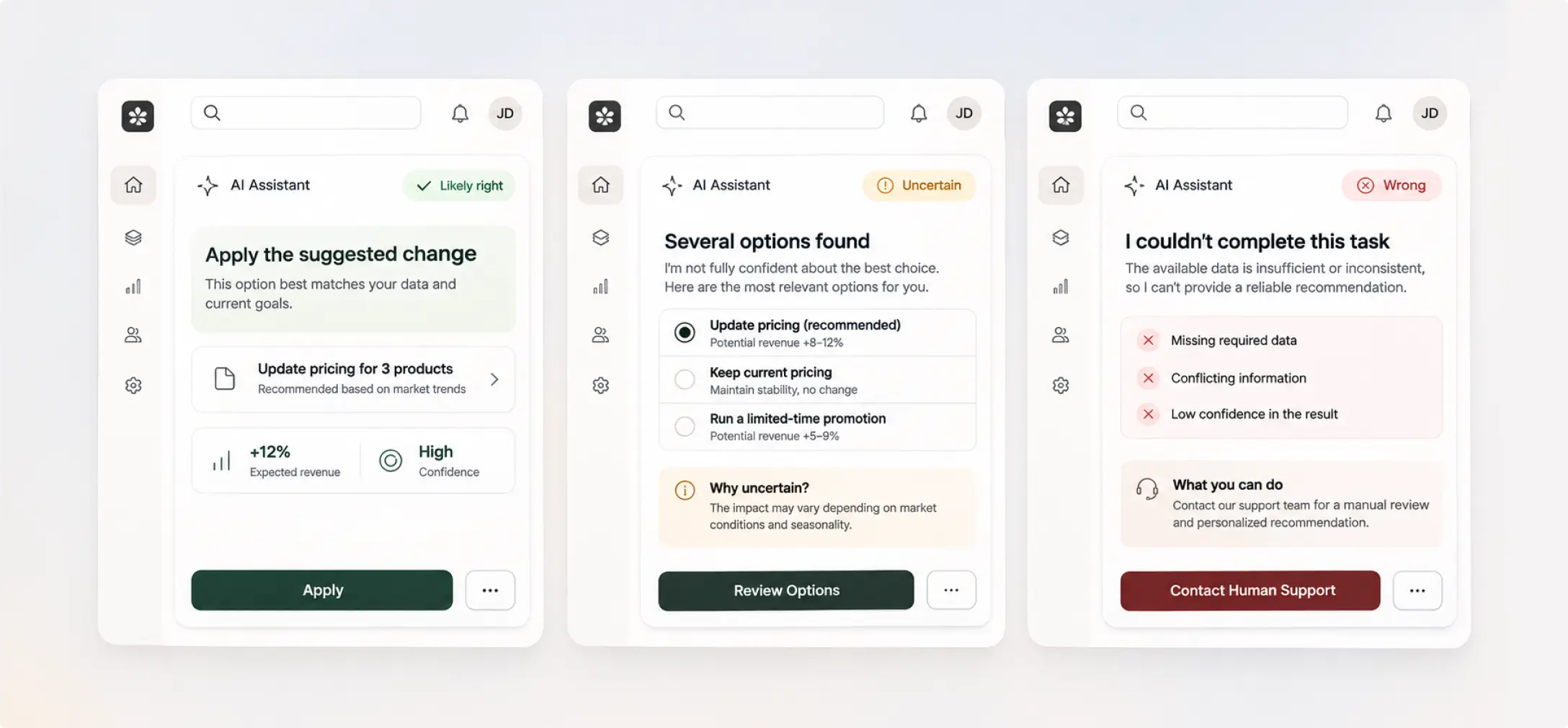
The AI-First UX Patterns Emerging Right Now
As AI transforms the design workflow, it’s also creating entirely new interface paradigms. Designers who understand these patterns now will be ahead of the curve.
Conversational and Generative UX
This goes well beyond chatbots. Modern AI interfaces generate custom outputs: personalized summaries, dynamic recommendations, tailored plans. Designing for these experiences means thinking in natural language intent, not just buttons and menus. The interaction model has changed. The design language needs to follow.
The Three States of AI
Every AI-powered interface operates in one of three states, and designers need distinct patterns for each:
1. Likely right: Show confidence. Enable quick action without friction.
2. Uncertain: Present options. Explain the reasoning. Let the user decide.
3. Wrong: Escalate to a human. Explain what happened and why.
When an interface changes without explanation, trust breaks. Users don’t need AI to be perfect. They need it to be honest.
AI-First UI Elements
A new vocabulary of UI components is emerging:
Pre-prompt interactive buttons that guide users before they type a query
Voice integration for hands-free interaction across contexts
Memory management that lets AI retain context across sessions
Intentional latency cues that signal the AI is processing, setting accurate expectations
These aren’t decorative features. They’re functional trust mechanisms.
Ethical Guardrails
AI-first design carries real responsibility. The patterns that protect users:
Privacy by design: Clear consent flows, data minimization built into the architecture
Bias mitigation: Human review of AI recommendations before they reach users
Explainability: Showing users why the AI made a specific recommendation
Human-in-the-loop: Clear escalation paths for decisions AI shouldn’t make alone
These aren’t optional considerations. They’re the foundation of user trust in AI-powered products.
AI Changes the Methods. Humans Define the Mission.
AI can wireframe faster, analyze research data in minutes, and generate interface variations at scale. But it can’t frame the right problem. It can’t feel what users feel. It can’t make ethical calls or build trust through empathy.
The designers thriving right now aren’t the ones fighting AI. They’re the ones using it to eliminate the bottlenecks, so they can spend more time on the work that actually matters: understanding humans, solving real problems, and building experiences that feel right.
At Bright Nation, we design at this intersection. Strategic, AI-informed, and always grounded in what your users actually need. If you’re ready to build something that works as well as it looks, let’s talk.